

In this article, we’ll look at SEO for beginners. So if you’re a small business owner and you’re not sure where to start with SEO, I’ve got you.
What is SEO?
SEO or Search Engine Optimisation is the practice of optimising websites and content so that they rank higher in search engine results pages such as Google.
Why Should I Care About SEO?
SEO is a relatively cheap and easy way to increase organic traffic to your website.
If a website ranks in the first few pages of search results, it is more likely to receive traffic. It is a great way to increase visibility, gain trust and get a competitive advantage.
As a small business owner, you may not be able to compete with the big advertising budgets of the big brands, but you can absolutely do your own SEO and rank higher in search engine results pages (SERPS) without spending a fortune.
How Long Before I Start Seeing Results?
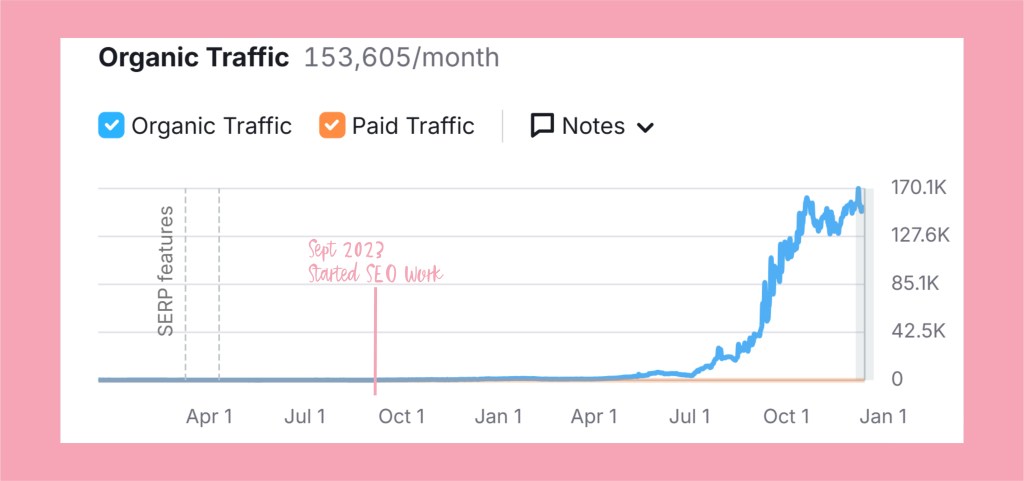
I started working on my small business’ SEO in September 2023 and started seeing real growth about 12 months later (see below image). SEO is not a quick fix and it will not bring thousands of visitors to your site overnight. It will, however, set you up long term and help you build your brand.
Of course, the amount of time it takes for your SEO efforts to pay off will be different for every website, and it depends on the competition and how popular your keywords are. I spent about 1-2 days a week working on my SEO, but I’m aware that this isn’t always possible. If you are a solo creative working hard to do all the things and make all the orders, set yourself small weekly goals and tackle it in 10 minute chunks between other tasks.
How Can I start Implementing SEO Now Without Paying An Expert?
You absolutely do not need to hire an SEO expert to implement SEO. All it takes is a little research, some time and a few really useful tools.
Here are some of my favourite SEO tools-
SEMrush
Google Analytics
Google Search Console
Google. Yes, I know, Google! Get on Google and search for terms that are relevant to your product. Scroll down and you will see ‘People also ask’ – and it will have a list of questions that are related to your search terms. These are useful keywords to include in your product descriptions, but include them in a way that reads organically and makes sense. This is super important. If you scroll down even further in your Google search, you will see Google’s suggestions for similar searches. These are also relevant keywords and worth considering including in your webpage.
Here Are 10 DIY SEO Quick Wins You Can Implement Straight Away
1- Start a blog in your niche. Some simple research will help you find the keywords people are searching for so get onto Google and get hunting.
For example, perhaps you sell fancy pens, so your blog might focus on providing audiences with advice on choosing the right pen, writing on different types of paper or how to improve your handwriting. Add a sneaky link to one of your relevant products in each article and maybe a product photograph, but don’t make them the main event. People are there to answer a question or learn something. By giving expert advice in your own niche, you secure your spot as a professional and reliable source. Blogs give you plenty of opportunities to add those keywords and get discovered.
2- Sign up for SEMrush. There is a free option that gives you limited access each day so you can see where your website is now and track progress. It will also show your competitors and loads of other useful information.
3- Add alt text to your product photography. Whether this is on Etsy or your own website, the process is roughly the same. Once you have uploaded your photograph, click on it and there should be a box to type your alt text in. You need to write a description of the image, but you can easily include a keyword here.
4- Re-write your product descriptions. Include 1-5 relevant keywords per page. Make sure your product descriptions include all the relevant information- sizes, variations, etc. But also include the product’s story- how you came to design it, how it is made, why this product is better than alternatives. People don’t buy what you do, they buy why you do it.
5- Re-name your images before you upload them. Because an image with the name “Mermaid_Birthday_Card_Pink” is going to tell Google far more than “IMG-6587”.
6- Beware of keyword stuffing. It’s tempting to just list off a whole load of relevant keywords and hope for the best, but this will actually work against you. You need to choose 1-4 keywords per page, all relating to the same topic. Make sure that it is written in a way that reads naturally and organically. If you shoehorn in as many keywords as possible, this is called keyword stuffing and Google will penalize you for it so your page won’t rank in searches.
7- Add Meta descriptions to each webpage. While these don’t necessarily impact your SEO, they do make a difference. A meta description is a short description that appears on search engines under the webpage title. You get 155 characters to convince audiences to click on your link. We’ll talk more about this in a separate post soon.
8- Set up Google Analytics and Google Search Console. This will help you to track your progress.
9- Add relevant internal links where appropriate. Link other products that your customers might be interested in, or perhaps you’ve written a blog article about how to use this particular product.
10- Make sure your site is mobile friendly.
Of course, there are so many more things we could discuss here, but the SEO checklist shown above is the exact process I used to increase our organic traffic for our small business. And the best bit? I did it all myself, without having to pay an expert. Would you like more beginner SEO tips for small business owners? Let me know what you’d like me to cover.

 The Makers Hub