
How to write a blog article- the ultimate guide for beginners and small business owners.
Blogging made such a huge difference to my product-based business- it brings most of our organic traffic. I’ve already looked at the benefits of blogging, but if you want more on this, check out this article here.
If you have a Shopify store, Wix store or other similar website, there is probably a blog feature ready to go. We set up our blog in our Shopify store and it was so easy that I managed it myself! I didn’t have to follow any complicated instructions or use any code, so it’s worth having a look to see if your online shop has this feature available to you.
How Do I Decide What To Write A Blog Article About?
The first thing to do here is get a really good idea of who your ideal customer is, what they might be searching for and what they’ll want to know more about.
Perhaps you make coffee pots, so you might want to write about choosing the right coffee, making the perfect cup of coffee or storing coffee to keep it fresher for longer. These are all useful, informative posts that will educate your audience and attract coffee drinkers to your site.
Spend time searching on Google for your broader search term, in the example above that would be coffee. Google will make suggestions and show a list of questions that people search for. These can be a great starting point for your blog topics.
I have created a helpful list of 31 blog post ideas, check it out here.
Content Pillars For Blogging
Come up with 3-4 content pillars, or broader topics to guide your blog content. A content pillar is an overarching theme that informs your content. If you have 3-4 content pillars based on your products, your brand values and your audience’s interests and pain points, you should never run out of ideas for blog subjects or social media content.
I’ll give you an example. As a marketer offering support for creative small business owners, my content pillars are- Etsy selling, Brand Identity, Small Business Ownership and Blogging. These topics are all relevant to my audience, they give me a whole heap of topics to write about and keep me on track. It would be pointless for me to have, for example, Cornwall life, Parenting tips and Vintage Clothing as content pillars because, although I know about all of these things, they won’t apply or appeal to many of my readers.
On this note, another way to generate ideas for your blog posts is to look through your social media posts. Find the ones that received lots of engagement or interest, and turn them into a blog post where you go into more detail. Look at what your competitors are posting about. Obviously don’t copy them, but you can certainly get inspiration from them. These also great ways to find your content pillars.
What Should I Title My Blog Article?
It can be helpful to save the title until after you’ve written your article. This means that your title will make a promise to the audience that it can definitely deliver. All too often, I’ve created a title first, the article content has evolved and I’ve had to change the title to match. These days, I just save the title for last.
Effective Blog Titles
There are certain blog title structures that are more effective than others.
Using a number at the start of your title is always a winner. E.g. ‘7 unique ways to wrap a gift’ or ’27 reasons why shopping small is better than buying mass produced.’
Or you could write the ultimate guide to something. E.g. ‘The ultimate guide to blogging’
Most importantly of all, make your title specific, address your audience’s pain points and don’t make it too long. Think of your blog title like a hook for a reel on social media; it’s got to catch audiences’ attention and make them want to read more.
How Long Should A Blog Post Be?
The short answer to this is: it depends.
The slightly longer answer is that it depends on the content and purpose of the blog.
Here is a rough guide, according to SEO experts SEMrush:
Announcements and short brand updates – approximately 500 words
News and educational posts- 700-1000 words
Informational posts (for building search engine authority)- 1000-1500 words
Guides and how-to articles- 1500-2500 words
When you write your article, try to avoid big blocks of text. Instead, write clear paragraphs and chunks of easy-to-read text. For lists, use bullet points or numbers and break it up with headings.
What Are The Different Blog Headings For?
You could just break up your text and create your headings by making text bold, sure. But there is a better way.
If you highlight your heading and change it from paragraph to a heading, it creates a sort of framework or plan for your article, making it easier to read, easier for readers to scan through quickly to find what they need, and further informing search engines of your content to help with your SEO.
These headings do have a sort of hierarchy, it works like this-
H1 = The main title of your blog. You should only have one of these per post.
H2- The main points of your article.
H3- Sub-sections of your main points
H4, H5 and H6-These are more subheadings, but be careful not to over-complicate things with these.
How To Make A Blog Post SEO Friendly
SEO, or search engine optimisation, is a powerful way to drive organic traffic to your website. Here are some tips for making you blog articles more SEO friendly.
Use Keywords
Pick a main keyword for each post, be sure to include it in the title and the main body of text. You can also include similar and related keywords. A keyword may be a single word, but it also may be a couple of words or short phrase.
Include your main keyword in the title and body of text, but also include slight variations and similar keywords in the article. Be careful not to overdo it- if you include too many, this is called keyword stuffing and it is not good for your SEO.
How to find keywords for blog posts
There are lots of ways to find keywords for your blog posts, but here are a few ways:
- Google Keyword Planner
- Ask Chat GPT
- Think like a person searching for a solution to their problem
- Brainstorm relevant search terms
- Semrush
Publish useful, informative, high quality content
That means well researched information with reliable sources. Also, publish content that is free from spelling errors and typos. Proof read.
Avoid Keyword Stuffing
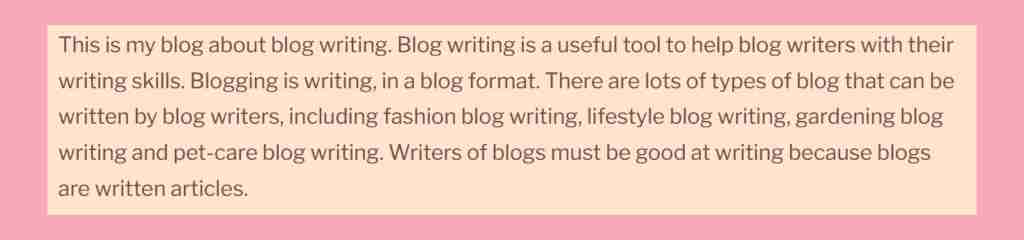
That’s where keywords are shoehorned in at every possible opportunity. It doesn’t read nicely and often doesn’t even make sense. Search engines penalise websites that do this, so just don’t! Here is a fine example of keyword stuffing, as written (but, thankfully, never published) by yours truly. Enjoy!
Internal links
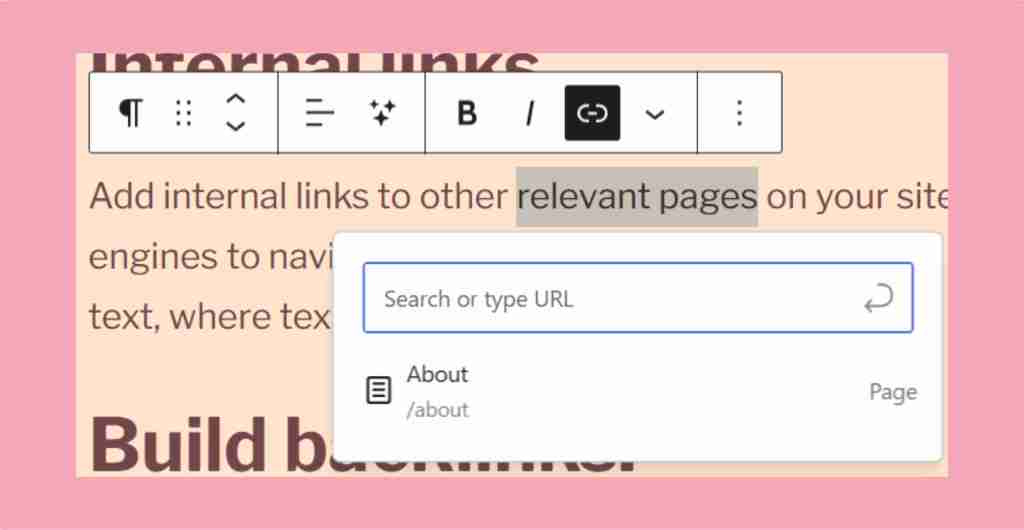
Add internal links to other relevant pages on your site. This helps audiences and search engines to navigate your website and understand its structure better. You can add anchor text where text acts as a link, just like this. The image below shows how to do this in WordPress.
Build backlinks.
These are links from other websites to your site. You can do this by creating useful, high quality content that people will share.
Can I Use AI To Write My Blog Post?
AI services like Chat GPT can be really helpful for generating content ideas and suggesting structures or outlines for blog articles. They are useful if you tell them your blog title and ask them to suggest a rough outline for your blog post. You could ask it to generate a list of potential blog topics in your niche, or give you a list of pain points for your ideal customer.
A Word Of Warning When It Comes To AI And Blog Writing…
Firstly, AI doesn’t always get it right, so fact check everything.
Secondly, AI has a very special way of making every piece of content it creates sound like it was written by AI. It doesn’t quite sound human, it often takes an overly enthusiastic tone and it overuses certain words and phrases.
Here are a few of them, see if you can spot them in blogs you read:
- Harness the power of
- It’s important to note
- Pave the way
- Unlock the potential of
- And that’s why…
- Seamlessly
- This isn’t just a…, it’s a…
I would be very wary of just lifting a piece of content from Chat GPT and putting it straight on your blog. Blogs are there to build connection with your audiences, and if your content has been generated by a machine, people will notice. This not only risks you looking inauthentic and losing trust, but it also can be a bit boring to read. In a fast, mass-produced, automated world, people crave human connection and emotions. You simply don’t get that from an AI created piece of content.
Should I Add Images To Blog Posts?
Images can be an effective way to break up the text, but there are some things to watch out for. Don’t use generic, poor quality or weird shaped images. You can add stock images from websites such as Pexels or Unsplash, but make sure that they fit with the content, colour scheme and general look of your site.
Note to Shopify users based on my own experience- Shopify will automatically make the images you add to your blog articles huge, so you need to click on the image and resize it to a more sensible size. I usually select the option ‘product image size’.
Always add Alt text to your images. This is a sentence or two to describe the content of your image to make it accessible for visually impaired users, but it also helps with SEO. You can add a keyword to your descriptions, but don’t just list off a load of keywords as this is known as ‘keyword stuffing’ and may negatively impact your webpage’s visibility.
How Often Should I Add New Blog Posts?
This is a ‘how long is a piece of string?’ kind of question. How many blog articles can you realistically write in a week without losing the quality? There’s not much point in writing 34 blog posts a week if they aren’t good quality. You would be better placed writing one really well written, insightful post that will give your audience something, whether that is entertainment or information.
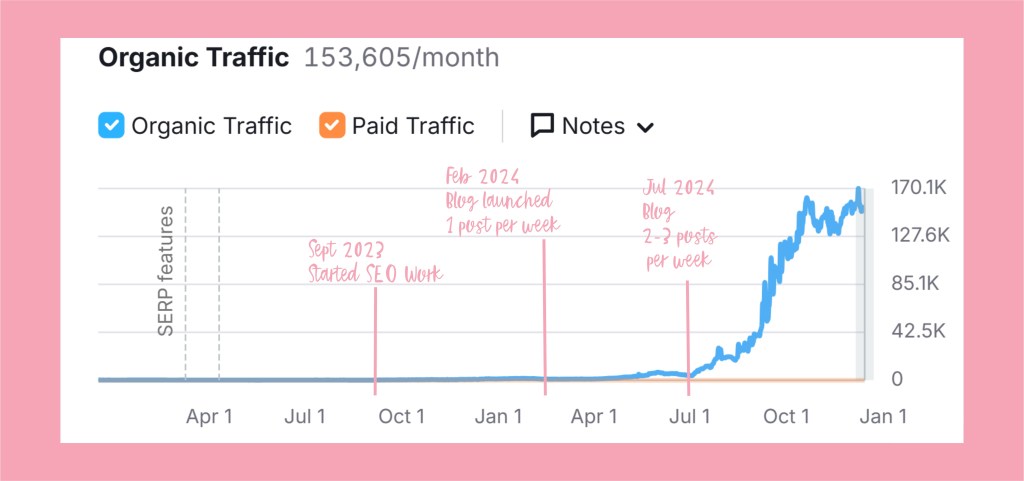
I personally grew my product-based business’ organic traffic considerably by writing 2-3 posts a week. It takes a while, but I have one post in particular that consistently brings in 10k+ visitors every month.
How Can I Use Blogging To Increase My Sales?
While blog writing for your business won’t directly increase sales, it will (or, at least, it should) bring more traffic to your website. If you select your content pillars carefully and do your keyword research, you will be attracting the right people to your website.
You can then help your readers to discover your products with shameless plugs, conveniently placed in the relevant places in your article. By this, I mean, include beautiful product photos in your articles and add links to each photo. Don’t forget your ALT text on the images, too.
You could also add a couple of sentences at the end of your article, suggesting that readers take a little mosey on over to a relevant collection of yours, with links, of course.
Sneaky and genius, huh?!
Summing Up
That’s my ultimate guide to blogging for beginners and small business owners. What have I missed? Is there anything you’d like me to cover in more detail? Let me know in the comments or drop me a message.


 The Makers Hub